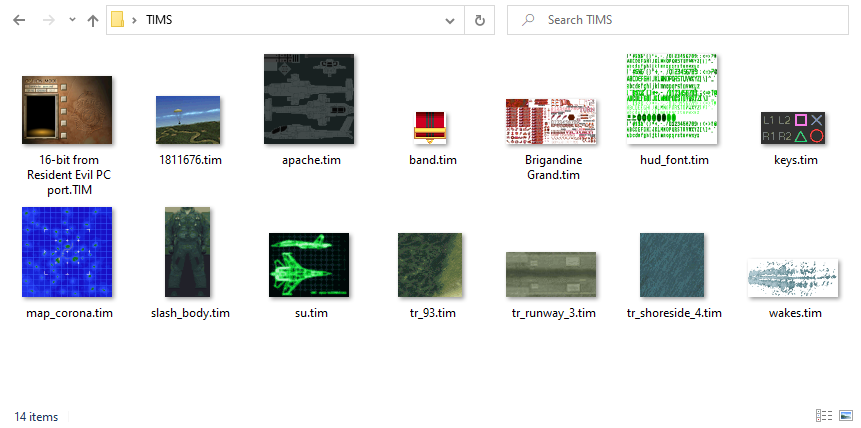
Papa’s Best TIM Thumbnails |
See the content of PlayStation 1 textures directly in Windows Explorer.
The perfect tool for modding, analysis, and reverse engineering of old PSX games. Runs on Windows 7 or later.
Feel free to donate if you like my program!
recommended
for old systems
Papa’s Best TIM Thumbnails installs for the current user by default. To install for all users on a system, open a command prompt or a PowerShell and run msiexec /i "Papas Best TIM Thumbnails.msi" MSIINSTALLPERUSER="".
Ensure thumbnails are generally enabled. Are thumbnails working with other file types on your system, e.g. photos? If not, you may have disabled them altogether.
Is User Account Control (UAC) disabled? UAC plays part in isolating user accounts from one another. Since the thumbnails install in a user context, they may not run properly with UAC disabled. If you are absolutely sure about keeping UAC disabled, you have two choices:
Clear your thumbnail cache. This forces Explorer to request new thumbnails instead of relying on outdated data.
cleanmgr.exeClear your Explorer thumbnail cache (see above) or copy the file to a different location.
This is a bug in Windows 10 that also affects other thumbnails – for example transparent PNG images here and here.
I can’t do anything in my program to work around it, I’m afraid. Please use the Windows 10 feedback function to report this to Microsoft. If enough users do it, they may eventually fix it. Windows 7 does not have this bug.
Encountered a problem? Have a suggestion? Let me know: info@papas-best.com